EMLE Notes - Sign Up
Welcome to EMLE Notes !Here’s how to get started with signing up and verifying your account.1. S
Welcome to EMLE Notes !
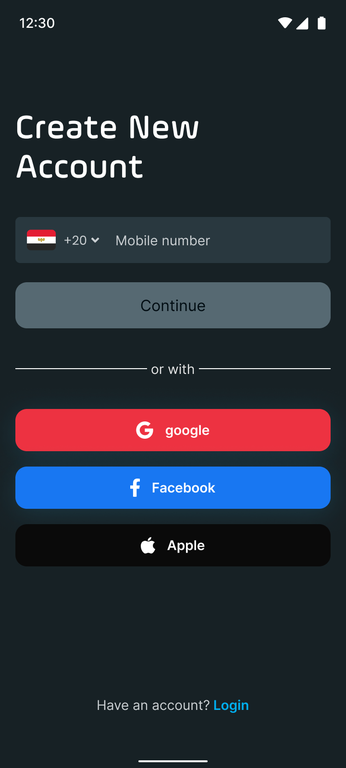 Here’s how to get started with signing up and verifying your account.
1. Sign Up: Create Your Account
- Open the App
Launch the e-learning app on your mobile device. If you haven’t downloaded it yet, visit [App Store/Google Play Store link].
- Click on “Sign Up”
On the Login screen, tap the Sign Up button to begin your registration.
- Enter Your Mobile Number
Type in your active mobile number. This will be used to verify your identity and keep your account secure.
take care of choosing the right country code then "Continue With Telegram"
- Via Telegram Code
- After clicking "Continue With Telegram", a new window with instruction will appear so you should click on "Open Telegram"
- Click the Icon ( ) then choose verify my number
- one you click it , it will send you a verification number
- Enter the code in the provided field within the app to verify your number in 5 minutes
- Create a Password
Choose a strong password for your account to ensure security.
A strong password typically contains a mix of uppercase and lowercase letters, numbers, and special characters.
- Agree to Terms & Conditions
Review and accept our Terms of Service and Privacy Policy by checking the box. Once you’re ready, hit Continue to proceed.
FAQs: Common Questions About Signing Up
- I didn’t receive my SMS code. What should I do?
Ensure your number is correct and you are connected to stable internet
If the issue persists, tap Resend Code.
if persists , contact customer support ( )
تجربه تعليق