EMLE Notes - Activation Request
Welcome to EMLE Notes !Here’s how to Send Activation Request
Welcome to EMLE Notes !
Here’s how to Send Activation Request
1-Sending a Course Activation Request
Once registered, follow these steps to activate your course:
a. Navigate to Course Activation
• From the app's home screen, go to the Home section.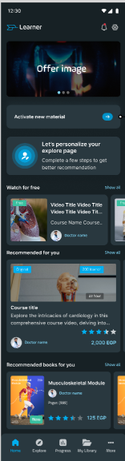
• Tap on Request Activation 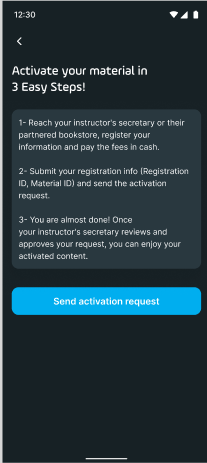
b. Provide Course Details
• Enter the Course Code for the class you wish to activate.
o This code should be provided by your instructor or the course administrator.
• Enter your Registration ID. 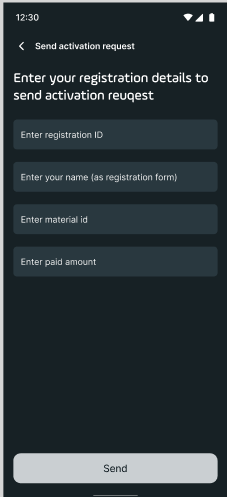
o This ID typically comes from your institution or may be assigned upon registration.
• Provide the Payment Value (if required).
o If there’s a fee associated with course enrollment, enter the amount here to facilitate payment verification.
2- Submitting Your Request
• Once all required fields are filled, tap Submit Activation Request.
• You will receive a confirmation message, and our team will verify the information provided.
3- Verification & Confirmation 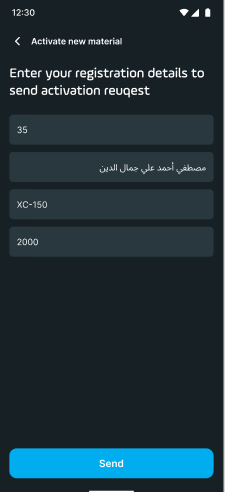
• After submitting your request, you will get a notification within 24-48 hours confirming that your course has been appear in my library section
No comments yet. Login to start a new discussion Start a new discussion